
Stunning Creations
  • Home
  • OUR SERVICES
    • Overview of Services
    • WEB DESIGN AND DEVELOPMENT >
      • Why have website?
      • Self Build Platform >
        • First Steps
        • Help Centre
      • Pro websites >
        • Free Quote
        • Build Me 1 Packages
      • ONE PLAN
    • GRAPHIC DESIGN AND PRINT >
      • Creative logo
      • Brochure Design
      • Leaflets & Flyers Design
      • Company Branding
      • Business Stationery
    • DIGITAL MARKETING >
      • Pay Per Click Advertising Agency | Stunning Creations LTD
      • SOCIAL MEDIA SUPPORT >
        • Facebook Support For Start-ups and Small Businesses >
          • How to Create a Facebook Page For your Business in 5 Simple Steps
          • Bring your Facebook page to life with Tips for successful
          • How to set-up and promote your business on Facebook in UK | Live Webinar
    • PROFESSIONAL EMAIL ADDRESS
    • HINTS AND TIPS
  • Past Projects
  • About Us
    • News
    • Job Opportunities
    • Terms & Conditions >
      • PRIVACY POLICY
  • store
    • Christmas sweet jars
    • Product

How to use Custom PayPal Buttons for Sizes, Colors, Etc.


Our provided PayPal e-commerce elements enable you to create basic product lists for your online store. You can show a picture and description of an item and provide visitors with a price and button to purchase that item. Very straight forward. 

But what if you need to get a little fancier and include a drop-down menu for different sizes or colors (or anything else)?  Then you should build your Add-to-Cart buttons using PayPal's simple button generator and add the buttons to your site via our Custom HTML Element.  

PayPal walks through the process of creating payment buttons here:

https://www.paypal.com/cgi-bin/webscr?cmd=_shoppingcart-intro-outside

Click the "Create Your Button Link" on the above page to do just that.  Their create button tool gives you significantly more options than our built-in e-commerce elements. 
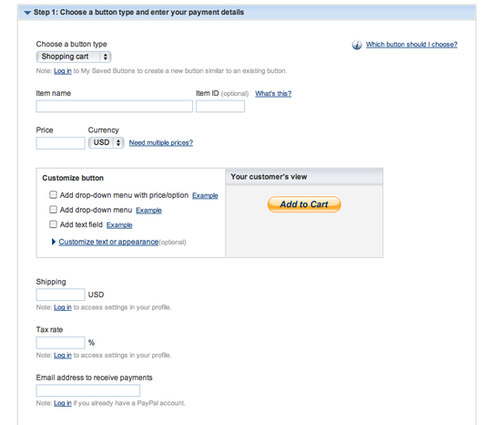
Picture
Once you've created your buttons, you can add them to your site using our Custom HTML Element. 

Note that you do not need (and should not) use our own provided e-commerce elements in conjunction with PayPal generated buttons.  This will cause confusion and make it so nothing really works properly.  Which is likely the opposite of what you want. 

You should instead create a description of each item using our Paragraph w/ Picture element and then line each description up with the appropriate Custom HTML Button.  
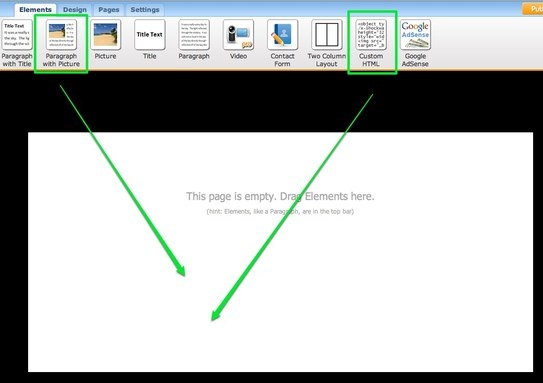
Picture
If you use these in conjunction with the Multiple Column Layout element, you can put the Paragraph w/ Picture element side-by-side with the Custom HTML element.  This will make the elements appear to be a single product listing.  This is how it would look in the editor: 
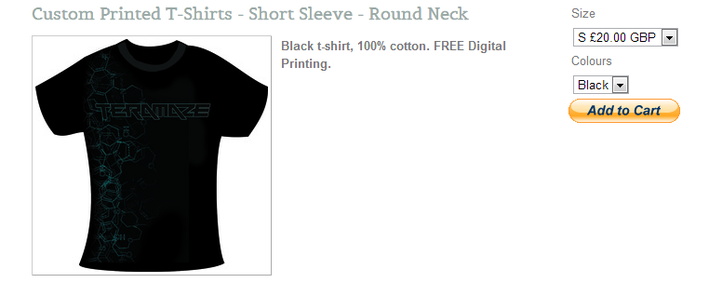
Picture
Back To Help Centre
Back To Help Centre
    First Steps
    1. First Step
    2. Adding Elements
    3. Add Pictures
    4. Layout Of A Page
    5. Themes & Edit Fonts
    6. Edit The Header
    7.1 Adding Pages
    7.2 Adding Blog

Main Links

Home
Our Services
About Us
Contact Us

Our Services

Pro Website
Self Build
Email Services

Domain Name

About Us

About Us
Our News
Our Mission
Our Terms & Conditions


Hint & Tips Blog
Job Opportunities
Find Us
Subscribe

TERMS & CONDITIONS | PRIVACY POLICY

COPYRIGHT © STUNNING CREATIONS... All Rights Reserved...

  • Home
  • OUR SERVICES
    • Overview of Services
    • WEB DESIGN AND DEVELOPMENT >
      • Why have website?
      • Self Build Platform >
        • First Steps
        • Help Centre
      • Pro websites >
        • Free Quote
        • Build Me 1 Packages
      • ONE PLAN
    • GRAPHIC DESIGN AND PRINT >
      • Creative logo
      • Brochure Design
      • Leaflets & Flyers Design
      • Company Branding
      • Business Stationery
    • DIGITAL MARKETING >
      • Pay Per Click Advertising Agency | Stunning Creations LTD
      • SOCIAL MEDIA SUPPORT >
        • Facebook Support For Start-ups and Small Businesses >
          • How to Create a Facebook Page For your Business in 5 Simple Steps
          • Bring your Facebook page to life with Tips for successful
          • How to set-up and promote your business on Facebook in UK | Live Webinar
    • PROFESSIONAL EMAIL ADDRESS
    • HINTS AND TIPS
  • Past Projects
  • About Us
    • News
    • Job Opportunities
    • Terms & Conditions >
      • PRIVACY POLICY
  • store
    • Christmas sweet jars
    • Product